Can You 3D Print Metal? What It Costs, How It Works, and Whether It's Worth It

The short answer is: Yes. You can 3D print metal. In fact, metal additive manufacturing has fundamentally transformed industries from aerospace to medical devices. But if you are a maker, an engineer, or a small business owner wondering if you can click "print" on a stainless steel part from your desktop setup, the reality is far more complex.
The gap between melting plastic and fusing metal is massive. Before you invest in expensive materials or hardware, you need to understand the true costs, the workflow, and the physics involved. This guide will walk you through exactly how metal 3D printing works, what it takes to do it outside a factory, and whether you actually need metal in the first place.
How Can You 3D Print Metal? (The 3 Main Technologies)
When people talk about 3D printing metal, they are usually referring to one of three primary technologies. Understanding the difference is crucial, as they vary wildly in cost, safety, and accessibility.
Method 1: Industrial Powder-Bed Systems (LPBF, DMLS, SLM)
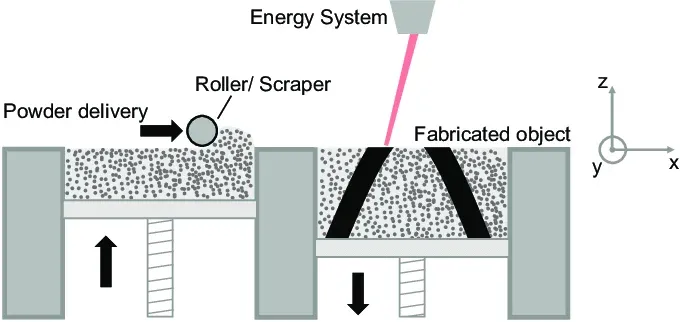
The most prominent industrial technologies are Laser Powder Bed Fusion (LPBF), which is also commonly referred to as Direct Metal Laser Sintering (DMLS) or Selective Laser Melting (SLM). These machines use high-powered fiber lasers to selectively melt micro-fine metal powder layer by layer.
While this method produces parts with incredible density and isotropic strength, industrial powder-bed systems require specialized facilities, safety procedures, inert gas handling, and strict powder management, making them impractical for most home users or standard design studios.
Method 2: Binder Jetting
Instead of melting metal with a laser, Binder Jetting acts more like a 2D inkjet printer. It deposits a liquid binding agent onto a bed of metal powder to shape the part. The resulting "green part" is then sintered in an industrial furnace to achieve its final density. While it's excellent for high-volume manufacturing, Binder Jetting remains an expensive, factory-level infrastructure.
Method 3: Metal FFF (Metal Filament)
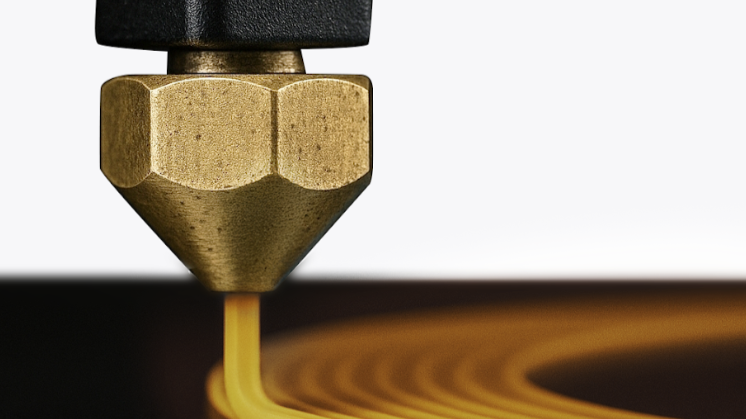
This is the desktop revolution. Metal Fused Filament Fabrication (FFF) allows users to print metal parts using machines that look and act very much like standard FDM plastic printers.
Some companies have developed filaments that combine pure metal powder (around 80-90% by weight) with a polymer binder. Because the metal particles are encased in plastic, this method greatly reduces the handling risks associated with loose metal powders, making it the most viable entry point for desktop and DIY manufacturing.
Can You 3D Print Metal at Home?
Yes, but with limitations. While you cannot safely run industrial powder-bed systems in a garage, setting up a home metal 3D printer is technically possible using Metal FFF technology. You can extrude the metal-infused filament safely on a capable desktop machine, but you still cannot complete the entire manufacturing process at home.
You will need to outsource the highly specialized debinding and high-temperature sintering processes to a professional facility. When factoring in the expensive filament, the external processing fees, and the turnaround time, home metal printing is more of a hybrid workflow rather than a fully independent DIY process.
What Metals Can Be 3D Printed?
When exploring what materials can be 3D printed, you will find that advancements in material science have made a wide variety of metals available, though their compatibility with desktop workflows varies significantly.
- Stainless Steel (316L & 17-4PH): The absolute workhorses of metal 3D printing. Known for excellent corrosion resistance and strength. Widely used for fixtures and brackets. (Desktop FFF Friendly? Yes)
- Titanium: Prized in the aerospace and medical implant industries for its incredible strength-to-weight ratio and biocompatibility. (Desktop FFF Friendly? No - Industrial only)
- Aluminum: Used extensively for lightweight structural parts and heat sinks. (Desktop FFF Friendly? No - Industrial only)
- Tool Steel: Extremely hard and heat-resistant, perfect for manufacturing jigs, molds, and tooling inserts. (Desktop FFF Friendly? Mostly Industrial, though some filaments exist)
- Copper: Ideal for heat exchangers and electronic components due to its superior thermal and electrical conductivity. (Desktop FFF Friendly? Mostly Industrial)
How Much Does Metal 3D Printing Cost?
The phrase "desktop metal printing" often gives a false impression of affordability. To truly understand the economics, you must look beyond the initial filament purchase.
Typical desktop Metal FFF projects can range from tens to hundreds of dollars per part after accounting for all necessary steps. It is important to note that actual costs vary significantly by service provider and geometry.
Where is this money going?
- Filament: Industrial-grade metal filament costs upwards of $150 to $200+ per kilogram.
- Debinding & Sintering: You cannot bake these parts in a kitchen oven. Sintering service tickets or outsourcing costs typically run around $50 per kilogram.
- Shipping: You must ship your fragile printed parts to a facility and pay for the return of the heavy solid metal parts.
- Failures (The Shrinkage Tax): During the sintering process, parts shrink significantly. Depending on the material system, designers often need to compensate for roughly 15–25% shrinkage. For example, some 316L workflows may require around 120% scaling in XY and 126% in Z. Getting this wrong means starting over and paying for processing twice.
Real-World Applications of Metal 3D Printing
So, who is actually using this technology?
- Aerospace: Consolidating complex assemblies into single, lightweight topology-optimized components.
- Medical: Creating patient-specific titanium bone implants that encourage cellular growth.
- Automotive: Printing custom tooling, grippers, and replacement parts on the factory floor.
- Manufacturing: Producing low-volume, complex fixtures that would be too expensive to CNC machine.
For industrial giants, the high costs are easily justified. However, for most workshop fixtures, DIY projects, and functional prototypes, engineers often find that high-performance engineering plastics deliver sufficient strength at a fraction of the cost and lead time.
When Is Metal Actually Necessary?
Many makers and engineers searching for metal 3D printing are actually trying to solve a strength problem, not a material problem. They are tired of standard PLA breaking or PETG flexing under load. Let's look at when metal is truly required:
- Heat Exchangers: Must it be metal? Yes.
- Food Processing Parts: Must it be metal? Usually Yes.
- Chemical Exposure: Must it be metal? Yes.
- Structural Brackets: Must it be metal? Often No.
- Robotics Fixtures: Must it be metal? Often No.
- Manufacturing Jigs: Must it be metal? Usually No.
- Functional Prototypes: Must it be metal? Often No.
Advanced engineering plastics can often provide sufficient mechanical performance for functional validation and testing.
Metal vs Engineering Plastics: Which Material Do You Actually Need?
If your application doesn't involve extreme heat or corrosive chemicals, advanced engineering polymers like Carbon Fiber Reinforced Nylon (PA-CF) are rapidly replacing metal in functional applications.
- Extreme Heat Resistance: Metal is ideal; PA-CF is limited.
- Chemical/Corrosion Resistance: Metal is ideal; PA-CF is limited.
- Weight Reduction: PA-CF outperforms metal.
- Rapid Prototyping: PA-CF outperforms metal.
- Cost Efficiency: PA-CF outperforms metal.
- Tooling & Fixtures: PA-CF is highly recommended.
Frequently Asked Questions About Metal 3D Printing
Can you 3D print stainless steel?
Yes. Stainless steel (specifically 316L and 17-4 PH) is the most common material used in both industrial systems and desktop metal filament workflows due to its excellent strength and corrosion resistance.
Can you 3D print aluminum?
Yes, but practically only on industrial powder-bed systems. Aluminum is highly reactive and oxidizes rapidly, making it exceedingly difficult to process into desktop-friendly metal filaments.
Can a regular 3D printer print metal?
No, a standard desktop 3D printer cannot melt solid metal. However, if equipped with a hardened steel nozzle and high-temperature capabilities, some regular FFF printers can print metal-filled filaments, which must later be sintered in an industrial furnace.
Is metal 3D printing cheaper than machining?
It depends entirely on complexity and volume. For simple geometries, CNC machining is almost always cheaper and faster. For highly complex parts with internal channels or topology optimization (where machining would waste 90% of a metal block), 3D printing becomes more cost-effective.
What is the strongest metal for 3D printing?
Titanium (Ti6Al4V) and Inconel (a superalloy) are among the strongest and most heat-resistant metals printed today, heavily utilized in the aerospace sector via industrial powder-bed systems.
Can Bambu Lab print metal filament?
Yes, if equipped with a hardened steel nozzle and hardened extruder gears, machines like the Bambu Lab X1C can successfully extrude metal-filled filaments like BASF Ultrafuse. However, you still must outsource the printed "green part" for professional debinding and sintering.
Can an Ender 3 print metal?
Technically, yes, but it requires significant upgrades. A stock Ender 3 will quickly suffer severe wear from abrasive metal filaments. You must upgrade to a hardened steel nozzle, an all-metal hotend (capable of reaching ~250°C safely), and preferably a direct drive extruder.
How long does metal sintering take?
The physical time in the furnace takes a few days, as it involves a slow ramp-up in temperature to burn out the binder and fuse the metal. However, when factoring in shipping your part to a facility, waiting in their queue, and return shipping, the entire turnaround time for desktop users is typically 1 to 2 weeks.
Conclusion: Should You 3D Print Metal?
Yes, metal 3D printing is a revolutionary technology for applications requiring extreme heat resistance, chemical corrosion resistance, or specialized material properties. However, for most makers and engineers, the complex workflow—involving shrinkage compensation, external sintering, and high costs—makes it an overkill for standard functional parts.
Before you commit to a two-week logistics cycle for a metal part, test your design first. Print a PLA prototype on your desktop machine to check your fit, function, and assembly. This is where the Snapmaker U1 excels; by using your desktop machine to validate your design, you can ensure your final part is right the first time. Once validated, you can either move forward with confidence for metal production or use high-strength PA-CF on the U1 for a faster, more cost-effective solution that gets the job done today.
Ready to streamline your prototyping workflow? Discover how the Snapmaker U1 can help you iterate faster than ever before.